
Subscription Tracker App
The subscription tracker app that finds every recurring charge
SimpleFinances reads your real transactions, groups the ones that repeat, and shows you every subscription in one list, with what each costs you per year. You decide what to cancel, and you keep every dollar you save. One payment, no subscription, nothing to download.
Free to start: no card and no bank login needed.
$49.99 one time, no subscription · Works in any browser · 1,000+ people already tracking
Subscriptions are built to be easy to start and easy to forget. A streaming plan bills on the 3rd, a cloud-storage tier on the 14th, a fitness app once a year. Each charge is small enough to slip past you, and no single screen adds them all up. That's the gap a subscription tracker app closes. In a 2022 survey of 1,000 U.S. consumers, C+R Research found people first guessed they spent about $86 a month on subscriptions. Then, adding it up category by category, the real figure was $219. That's roughly $133 a month, or over $1,500 a year, more than they thought. Most people who run the tracker turn up recurring charges they'd completely forgotten about.
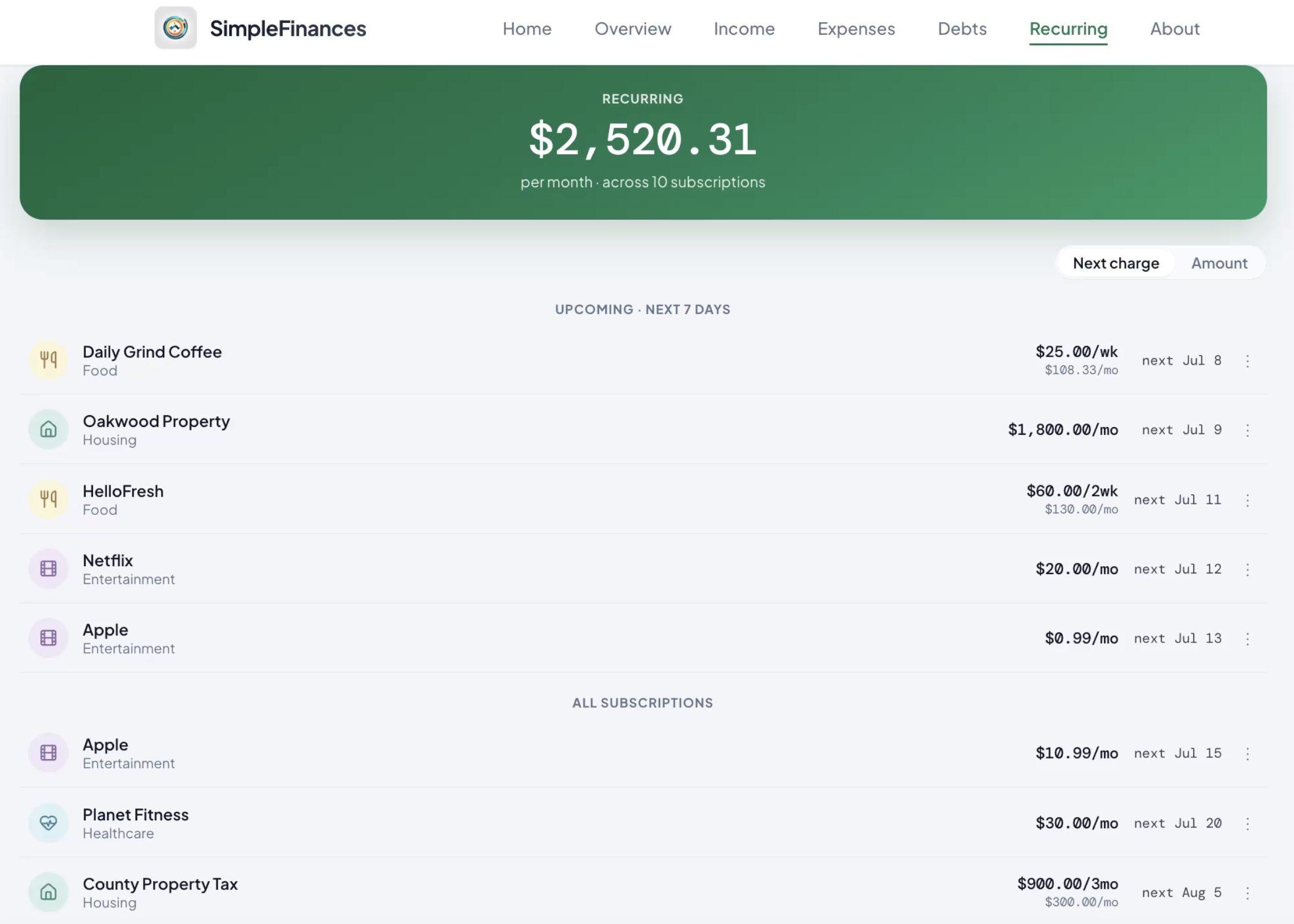
What does a subscription tracker app actually do?
A subscription tracker app pulls every recurring charge you pay into one place so you can see the total you've been paying in pieces. Instead of you scanning bank statements and five separate billing screens by hand, the app reads your transactions, spots the ones that repeat (monthly, annually, or on an odd cadence) and lists each subscription with its amount and how often it bills. The good ones go one step further and translate each charge into an annual number, because $14.99 a month doesn't feel like much until you see it as $180 a year. That's the whole job: turn scattered, easy-to-ignore charges into a single, honest list you can actually act on. This tracker does exactly this, then keeps the list current so a new charge, or a converted free trial, shows up before its second bill, not after its twelfth.
How does SimpleFinances find my subscriptions?
The tracker works from your actual transaction history, not a form you fill out. When you connect an account through Plaid, it imports your transactions, automatically sorts them into categories, and groups them by merchant. It then flags the charges that recur on a regular schedule and surfaces them as subscriptions: the direct card charges a phone's app-store screen never shows, plus the annual renewals a one-month statement scan misses. Each one is listed with its amount and billing frequency, and its cost is projected out to a full year so the number is impossible to ignore. If you'd rather not link a bank, you can add accounts and transactions by hand and the finder still works. The same transaction data also powers your spending review, financial health score, net-worth timeline, and cash-flow calendar, so tracking subscriptions is one view inside a fuller picture of your money.
How does it work, step by step?
Getting your subscriptions on screen takes three steps. There's nothing to install. It runs in your browser.
Connect an account, or enter it manually
Link a bank or card through Plaid for an automatic import, or skip the connection entirely and add your accounts and transactions by hand. Either way, your data lands in one place. Linking is faster and stays current on its own; manual entry keeps everything in your own hands.
Automatic categorization surfaces the recurring charges
The tracker sorts every transaction into categories, groups them by merchant, and detects the ones that repeat. No tagging, no spreadsheet. The subscriptions rise to the top on their own, including the annual charges that only hit once a year.
See the annual cost per subscription, and decide
Each subscription shows its amount, how often it bills, and what it adds up to over a year. Now the decision is yours: keep it, or cancel it at the source. It doesn't cancel for you and takes no cut. Every dollar you stop spending stays with you.
How much does a subscription tracker app cost?
SimpleFinances is not another subscription. The Full Financial Review is $49.99, one time. One payment. No subscription. You link every account (banks, cards, loans, investments) read-only, and if a bank will not connect you can drag and drop a statement instead. You get one complete financial review with every recurring charge found and totaled, 7 days of full Premium access to the whole toolkit (the recurring-charge finder, spending review, financial health score, net-worth timeline, and cash-flow calendar), and your review report, yours to keep. Nothing renews automatically from the $49.99. If you want ongoing tracking afterwards, that is a separate choice you make later, never before. And it comes with a 30-day money-back guarantee: full refund, no questions asked. Because most people turn up recurring charges they'd forgotten about, the review often pays for itself from the first subscription you cancel.
Full Financial Review One time
$49.99 one payment, no subscription
One complete review of your money, with every recurring charge found and totaled. Your review report is yours to keep.
What is included
7 days of full Premium access
Every account linked read-only, the recurring-charge finder, spending review, health score, net worth, and cash-flow calendar.
Money-back guarantee
30 days to decide
Full refund, no questions asked. Nothing renews automatically from the one payment.
Is it safe to connect my bank?
Yes. The app connects to your bank through Plaid, the same secure service many major finance apps use. The connection is read-only: it can see transactions to find your subscriptions, but it cannot move, send, or withdraw money. You enter your bank login with your bank through Plaid, and it's never stored by the app. Your login stays with the bank. Data is protected with bank-level encryption in transit and at rest. And if you'd rather not link anything at all, the manual-entry option means you can use the subscription tracker, spending review, and financial health score without ever connecting an account. The goal is simple: see the real number, on your terms, without handing over control of your money.
How is this different from doing it myself or a cancellation app?
You have three realistic options for getting on top of subscriptions: track them by hand, use an app that cancels them for you, or use a tracker like this one that finds them and hands you the decision. Each is a fair choice. Here's the honest trade-off.
| By hand | Cancellation app | SimpleFinances | |
|---|---|---|---|
| Finds recurring charges | Only ones you spot | Yes, from your transactions | Yes, from your transactions |
| Shows annual cost per charge | If you do the math | Usually | Yes, worked out for you |
| Cancels for you | No | Yes, for a cut or a fee | No. You cancel, and keep the savings |
| Stays current next month | No, you re-do it | Yes | Yes, new charges surface |
| Cost | Free (your time) | Often a % of savings or a subscription | $49.99 one time, no subscription |
The honest distinction: SimpleFinances finds and tracks your subscriptions. It does not cancel them for you. Apps like Rocket Money offer a cancellation concierge, which is genuinely convenient, but some charge a percentage of the money they save you. We take a different line: we show you every recurring charge and exactly what it costs per year, then you cancel the ones you don't want at the source. It's one more step for you, but you keep every dollar of the savings instead of paying a cut, and canceling at the source is what actually stops a charge for good.
How do the main subscription tracker apps compare?
Most budgeting apps now find recurring charges as part of a wider money tool, so the useful comparison is not which app has a subscription finder but what each one charges, whether it links your bank, and what else you are buying along with the finder. The prices below were read from each company's own site on the date in the caption.
| App | What it does for this job | Bank linking | Price (verified) | Best for |
|---|---|---|---|---|
| Rocket Money | Detects subscriptions automatically from linked accounts on the free tier; Premium adds a team that cancels them for you. Bill negotiation carries a success fee of 35 to 60 percent of first-year savings unless you are on Premium+ | Yes, on the free tier | Free tier; Premium $7 to $14 per month, an amount you choose; Premium+ $15 per month; 7-day trial | People who want someone else to do the canceling |
| Monarch Money | Full budgeting and net-worth app; detects recurring subscriptions automatically as one view inside it | Yes; its site cites 13,000+ institutions | Core $14.99 per month or $99.99 per year; Plus $199.99 per year; 7-day trial | Households that want one app for everything and are fine paying yearly |
| PocketGuard | Budgeting app whose paid plan lists subscription tracking, recurring and upcoming bills, and a cancel-subscriptions feature | Yes, US and Canada | Paid only, after a 7-day trial. The pricing page prices by region; from the UK it showed £10.99 per month, £59.99 per year, or £119.99 lifetime. US dollar prices are on the linked page | Lifetime-license buyers who want a budget with the finder built in |
| YNAB | Hands-on budgeting by the YNAB Method; links accounts and imports transactions with spending by category, but its features page does not list a subscription finder | Yes | $14.99 per month or $109 per year; 34-day trial, no card required | People who want to plan every dollar, not just spot the recurring ones |
| EveryDollar | Zero-based budget; you set due dates for bills and see upcoming expenses at a glance, so recurring charges are budget lines you enter rather than charges found for you | Premium only; the free version is manual entry | Free version; Premium $17.99 per month or $79.99 per year; 14-day trial | Ramsey-method budgeters who do not mind entering the charges |
| Copilot Money | Tracks accounts, spending, and investments automatically and flags recurring charges with their next date and amount | Yes | $95 per year ($7.92 per month equivalent); a monthly plan is offered but its page did not state the rate; trial offered | Apple users; it runs on iPhone, iPad, Mac, and web, with no Android listed |
| SimpleFinances (this site) | Finds recurring charges from your transactions and shows each one with its yearly cost; you cancel at the source and keep the savings; no cancellation service | Yes, read-only through Plaid, or manual entry | $49.99 one time, no subscription; 30-day money-back guarantee | People who want the list and the yearly numbers without another monthly bill |
How we compared: we make SimpleFinances, the last row, so read this table as a seller's summary rather than a neutral review. Every competitor price and feature above was taken from that company's own pricing, help, or feature page on 2026-09-28, and each name links to that site. Where a page did not state something, the cell says so. Prices and trial terms change often; the linked page wins over this table.
See every subscription you are paying for
Connect an account or add transactions by hand, and the tracker surfaces every recurring charge in one list, with the yearly cost worked out. Most people find charges they'd forgotten about. Finding and totaling every recurring charge is what the Full Financial Review does: $49.99, one time, no subscription, with 7 days of full Premium access and a 30-day money-back guarantee.
Full Financial Review: $49.99, one time. No subscription. 30-day money-back guarantee, full refund, no questions asked.
Can I track subscriptions without linking a bank?
Yes. If connecting an account isn't for you, the app supports manual entry: you add your accounts and transactions yourself, and the subscription finder still groups the recurring ones and projects their annual cost. It's slower to set up than an automatic Plaid connection and you keep it current by hand, but your data stays entirely in your own hands. Many people start with manual entry to try the app, then link a bank later once they've seen what it surfaces. If you want the thorough manual method for auditing subscriptions across bank statements, the App Store, Google Play, PayPal, and Amazon, our companion guide walks through every screen: how to find forgotten subscriptions you're paying for.
Whether you link a bank or enter it by hand, the win is the same: you stop guessing at $86 and see your real number. Every charge you'd forgotten becomes a decision you get to make on purpose. Start your free money audit, or see the Full Financial Review.
Sources
- C+R Research, "Subscription Service Statistics and Costs" (survey of 1,000 U.S. consumers, 2022): crresearch.com. Source of the $86 estimated vs. $219 actual monthly spend ($133 gap).
- SimpleFinances product data: 1,000+ users (per the homepage).
- Rocket Money pricing and tier features, fetched 2026-09-28: rocketmoney.com/learn/.../how-much-does-rocket-money-cost and help.rocketmoney.com.
- Monarch Money pricing and features, fetched 2026-09-28: monarch.com/pricing and monarch.com.
- PocketGuard pricing and feature list, fetched 2026-09-28 (the pricing page displayed British pounds to a UK visitor): pocketguard.com/pricing.
- YNAB pricing and features, fetched 2026-09-28: ynab.com/pricing and ynab.com/features.
- EveryDollar pricing and features, fetched 2026-09-28: ramseysolutions.com/money/everydollar.
- Copilot Money pricing and features, fetched 2026-09-28: copilot.money/pricing and copilot.money.