 SimpleFinances
The three kinds of free
Before comparing a single app, it helps to sort the word "free" into the three things it means in this market, because each one asks something different of you.
1. Genuinely free and open source. The code is public, the license lets you run it forever, and nobody is upstream waiting to charge you. The catch is effort: you either host it yourself or pay a third party to host it for you. Actual Budget is the clearest example, and it is the only app in this guide where "free" has no asterisk on the software itself.
2. Free tiers that are manual-entry only. These apps are honest about their model: the free plan is real and permanent, but it does not talk to your bank. You type every transaction. The moment you want automatic imports, you are on the paid plan. EveryDollar and Goodbudget both work this way, and PocketGuard's free tier sits close to this line with additional limits on features.
3. Free apps funded some other way. Your bank's own app is free because the bank already makes money from your deposits and your cards. Rocket Money's free tier links accounts at no charge, and the company earns from a paid tier, from a percentage of any bill it negotiates down for you, and from its place inside a larger financial-services group. None of that is secret, but it is the model, and you should know it before you connect anything.
There is a fourth option that predates all of them: a spreadsheet. It connects to nothing, sells nothing, and never changes its terms. What it costs is your time, every week, forever, and that time is usually the reason people went looking for an app.
How to read this guide. Every price and free-tier limit below was checked against the company's own website on September 6, 2026. Where a page could not be reached or did not state a number, this guide says so instead of guessing. Prices change often; treat the table as a dated snapshot, not a promise.
How each free budgeting app makes money
The single most useful question you can ask about a free money app is not "what does it do?" but "who pays for this?" The answer tells you what the app will nudge you toward, and what the free tier is designed to leave out.
Actual Budget: donations and paid hosting partners
Actual Budget is released under the MIT license, one of the most permissive open-source licenses there is. You can download it, run it on your own machine or server, and never pay anyone. The project's own homepage offers two paths: "Set up manually" or "Set up on PikaPods in 2 minutes." PikaPods is a paid hosting service, and Actual's site notes that PikaPods donates 20% of the fees it collects for hosting Actual back to the project's Open Collective. That is the funding loop: volunteers, donations, and a hosting partner who shares revenue. There is no upsell inside the app because there is nothing to upsell to.
The cost lives elsewhere. If you want US or Canadian bank sync, Actual uses SimpleFIN Bridge, a separate service that charges $1.50 plus tax per month or $15 plus tax per year. For Europe, Actual's documentation lists Enable Banking and GoCardless, the latter marked "not accepting new accounts." So the software is free, hosting may or may not be, and the North American bank connection is a small paid add-on from a third party.
EveryDollar: a free tier at the top of a funnel
EveryDollar is made by Ramsey Solutions, and its free plan is built to demonstrate the zero-based budgeting method the Ramsey ecosystem teaches. On the official page, the free version lets you create a monthly budget, build unlimited categories, use it across devices, and "manually enter and track transactions." Premium is where the bank connection lives: "connect your bank and stream transactions into your budget automatically," alongside coaching, goal tracking, and custom reports. Premium is $17.99 per month or $79.99 per year, with a 14-day free trial. You can see how much EveryDollar Premium costs next to SimpleFinances in our head-to-head. The free tier is not a trick; it is a real, working budget. It is also the front door to a paid plan and a wider set of paid courses and coaching, and the design reflects that.
Goodbudget: envelopes, with the paid plan funding the free one
Goodbudget is the digital envelope system. Its signup page lists two plans. The free plan is $0 and includes 10 regular envelopes, 10 more envelopes, 1 account, 2 devices, and 1 year of history, with no bank sync. The paid plan, which the page labels Premium, is $10 per month or $80 per year and adds unlimited envelopes, unlimited accounts, 5 devices, 7 years of history, and "automatic bank sync (US banks only)." Goodbudget's model is the simplest on this list: paying users fund the product, and the free plan is a permanently limited version of it. If you only have one account and fewer than twenty envelopes, the free plan may be all you ever need.
PocketGuard: a free tier with the useful parts behind Plus
PocketGuard sells a paid plan called Plus at $12.99 per month, $74.99 per year (the page presents this as $6.25 per month), or $149.99 for lifetime access, with a 7-day free trial. Its help center lists what Plus unlocks: connecting unlimited bank accounts, custom categories and budgets, a debt payoff plan, unlimited savings goals, automated transaction rules, import and export of transaction data, split transactions with receipts, and expanded cash-account tracking. That list is a reasonable proxy for what the free tier does not include. The official pages do not state the free tier's exact bank-connection limit, so this guide does not put a number on it. PocketGuard's pricing page says it runs no ads and does not sell data; the model is the subscription.
Rocket Money: free linking, paid tiers, and a negotiation fee
Rocket Money's free tier is the most generous of the connected apps: its site says you can "link your checking, savings, credit cards, and investments accounts to see everything in one place," with balance alerts, spend tracking, and subscription detection at no charge. Its own pricing article notes that real-time sync is a Premium feature. Premium is priced on a "pay what you think is fair" model, which its site describes as $7 to $14 per month, with a 7-day trial; its terms of service confirm that "you may choose the price you pay for Rocket Money Premium Services, with no change in service or functionality." A Premium+ tier is listed at $15 per month.
The second revenue line is bill negotiation. Per Rocket Money's terms, for anyone who is not a Premium+ member, "the current Negotiation Fee is decided by the user, anywhere between 35-60% of the 12-month savings achieved as a result of the negotiation." The terms give the example of a 40% fee on a $10-per-month reduction: $120 of first-year savings, $48 to Rocket Money. Premium+ members pay no negotiation fee. The third context is ownership: the site's footer states that Rocket Money, Inc. is a subsidiary of Rocket, LLC, whose sole managing member is Rocket Companies, Inc., the group best known for mortgage lending. A free dashboard is a natural fit for a company that also sells loans. That does not make the free tier bad; it explains why it can afford to be free.
Your bank's own app: free because you are already a customer
Every major bank ships a free app with balances, transaction history, some category tagging, and increasingly a budgeting view. It costs nothing because the bank earns on deposits, interchange, and lending. The limit is structural: it shows that bank. If your checking, credit card, and brokerage sit at three institutions, no single bank app gives you the whole picture, and most people searching for a budgeting app are searching precisely because their money is spread out.
Empower Personal Dashboard is not in the table. Three attempts to load Empower's official product pages on September 6, 2026 were blocked by the site. Rather than repeat figures from memory or third-party reviews, this guide leaves it out. If you are considering it, read Empower's own pages for what the free dashboard includes and how its advisory business relates to it.
What each free tier really includes
The same facts, side by side. The "free" column is what you can use indefinitely without paying anyone; the "paid line" is where that limit goes away.
| App | What is free | Bank linking on the free tier | Where the paid line sits | How it makes money |
|---|---|---|---|---|
| Actual Budget | The whole app, MIT license, self-hosted | Yes, via SimpleFIN Bridge (US and Canada), a separate service at $1.50 plus tax per month or $15 plus tax per year | No paid tier; optional paid hosting (PikaPods) | Donations; hosting partner shares fees |
| EveryDollar | Monthly budget, unlimited categories, manual transaction entry, multi-device | No; bank connection is Premium | Premium $17.99 per month or $79.99 per year; 14-day trial | Premium subscription; Ramsey Solutions courses and coaching |
| Goodbudget | 10 regular envelopes, 10 more envelopes, 1 account, 2 devices, 1 year of history | No; automatic sync (US banks only) is on the paid plan | Premium $10 per month or $80 per year | Paid plan subscriptions |
| PocketGuard | A basic tier; official pages do not itemize it. Plus-only features per the help center: unlimited bank accounts, custom categories and budgets, debt payoff plan, unlimited goals, rules, import and export | Could not be verified; Plus is required for unlimited connections | Plus $12.99 per month, $74.99 per year, or $149.99 lifetime; 7-day trial | Plus subscription; states no ads and no data sales |
| Rocket Money | Account linking, balance alerts, spend tracking, subscription detection | Yes; real-time sync requires Premium | Premium $7 to $14 per month, chosen by you; Premium+ $15 per month; 7-day trial | Premium tiers; negotiation fee of 35 to 60 percent of first-year savings for non-Premium+ members; subsidiary of Rocket Companies |
| Your bank's app | Balances, history, basic categories for that bank | Only that bank | None | Deposits, interchange, lending |
| A spreadsheet | Everything you build | No | None | Your time |
Which free budgeting app links to your bank account?
This is the question people actually mean when they search for a free budgeting app, and the honest answer is that free tiers with bank linking are rare. Connecting to a bank costs the app money on every account, every month, through an aggregator such as Plaid or SimpleFIN. Something has to pay for that, and free tiers are the first place a company trims. Among the apps verified for this guide:
- Rocket Money links checking, savings, credit card, and investment accounts on the free tier, according to its own pages. Real-time sync is reserved for Premium, so free-tier balances may lag. This is the only mainstream app in the table where a permanent free plan includes cross-bank linking without a separate purchase.
- Actual Budget supports bank sync in the US and Canada, but through SimpleFIN Bridge, which is a paid service from a different company at $1.50 plus tax per month or $15 plus tax per year. The app is free; the pipe is not. Many Actual users are happy with that trade because it is cheap, the software has no upsell, and their data stays on a server they control.
- EveryDollar and Goodbudget both put bank connections on the paid plan. Their free tiers are for typing transactions in, which some people prefer precisely because it forces them to look at every purchase.
- PocketGuard lists "connect unlimited bank accounts" as a Plus feature. Whether the free tier allows a smaller number could not be verified from its official pages on the day of writing, so this guide does not claim either way.
- Your bank's app is connected, obviously, and free. It is just connected to one bank.
If the connection is the feature you need and you do not want to pay, Rocket Money is the realistic answer; read the previous section to understand what funds it. If you are willing to pay a little, the cheapest connected setup here is Actual plus SimpleFIN. If you want connection with no offers and no self-hosting, you are looking at a paid plan somewhere, and the question becomes which one is honest about it.
Free budgeting apps for iPhone: what changes on a phone
Most of the apps above have an iOS app, and the free tiers are the same on iPhone as on the web, with one practical difference: subscriptions bought through the App Store are billed by Apple and cancelled in your Apple ID settings, not in the app. That is convenient for cancelling and occasionally confusing for pricing, because a listing's in-app purchase amounts do not always map neatly onto the plans on the company's website. Rocket Money's listing, for example, shows a spread of Premium price points that reflect its choose-your-price model rather than one monthly figure.
Actual Budget is the exception on iPhone. It is a web app you reach through Safari and add to your home screen, not a native App Store download. It works, but if you want a polished native iOS experience, that is a real difference to weigh.
If you are not paying, you are the product: is that fair?
Read enough forum threads about free money apps and one objection comes up more than any other: if you are not paying for it, you are the product. It is the market's loudest reason for distrusting a free app that asks for bank credentials, and it deserves a careful answer rather than a slogan.
The line is partly right. A company with a free product and a payroll is paying for it somehow, and the options are limited: a paid tier, a fee on a service, a referral when you take a financial product, a data business, or a parent company that benefits from your attention. Every free app in this guide fits one of those, and each says so on its site if you look. The problem is rarely that the model exists; it is that the free-app label invites you not to look.
The line is also partly wrong, in two ways. Open source breaks it: Actual Budget has no customer to sell you to, and you can read the code. And paying does not automatically buy trust. A paid app can still have a loose privacy policy, keep your data after you leave, or make cancelling a chore. Price is one signal, not the whole picture.
A more useful test than "is it free?" is a short list of questions you can answer from any app's own pages in ten minutes:
- Who pays, and for what? If the answer is not obvious within a minute, that is itself information.
- Is bank access read-only? Reputable aggregators provide read-only tokens; the app should say so plainly.
- Can you export everything? Your transaction history should leave with you, in a format a spreadsheet can open.
- How do you cancel or delete? Look for the cancel and delete-account paths before you sign up, not after.
- What does the app want you to do next? Every product has a next step it hopes you take. Make sure it is one you would want to take anyway.
A note on the word "free" in app listings. App stores label an app "Free" if the download costs nothing, even when the useful features are behind a subscription. "Free with in-app purchases" is the more accurate reading, and the in-app purchases section of a listing is often the fastest place to find the real price.
When a free app is the right answer
None of this means you should pay. Plenty of people are best served by a free tool; here is who.
- You have one or two accounts at one bank. Your bank's app plus a monthly look at the statement may be all you need. Adding a third-party app to a simple situation adds a login, not insight.
- You want to type every transaction. Manual entry is slower, and for some people that friction is the point. EveryDollar's free tier and Goodbudget's free plan are both mature tools for exactly this, and neither hides the fact that bank sync costs extra.
- You are comfortable running software. If you have a home server, or do not mind a small hosting bill, Actual Budget gives you a private, open-source budget with no company in the loop. Add SimpleFIN if you want US bank sync. This is the strongest "actually free" option on the list.
- You want connected balances at no cost and accept the model. Rocket Money's free tier is a legitimate way to see several accounts in one place without paying. Go in knowing how Premium, the negotiation fee, and the parent company fit together.
- You are just starting. A month of manual entry, in any free tier, teaches you what your spending looks like before you decide whether it is worth paying to automate.
The people poorly served by free tiers are the ones with money in several places who have already tried manual entry and stopped. For them, the free option usually turns out to be paid after the first month, and it is better to know the price up front than to meet it at the paywall.
Where SimpleFinances fits
SimpleFinances is not a free budgeting app, and this page would be dishonest if it ended by pretending otherwise. It is not a subscription either. It is a one-time Full Financial Review at $49.99: one payment, no subscription, nothing that renews. There is no trial to manage because there is a 30-day money-back guarantee instead, full refund, no questions asked. The price appears before you enter a card, so you will not find it at the bottom of a funnel. If your situation matches one of the free cases above, use the free tool; several of the ones in this guide are very good.
What the price buys is one complete review: every account (banks, cards, loans, investments) linked read-only, every recurring charge found and totaled, 7 days of full Premium access, and a report that is yours to keep. It also buys the set of things the free tiers tend to leave out, arranged so the trust questions above have plain answers:
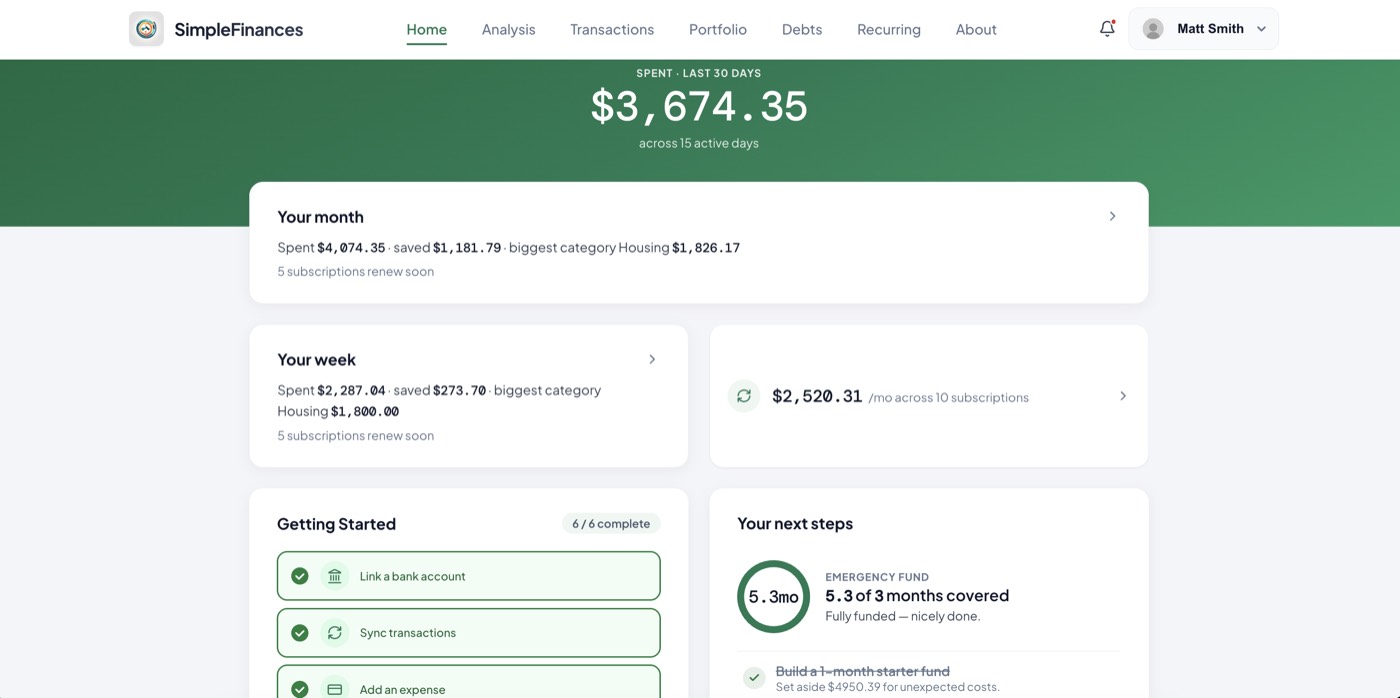
- Bank access is read-only. Connections go through an aggregator with read-only tokens; nothing in the app can move money.
- If a bank will not connect, drag and drop a statement. Connection failures are the most common reason people abandon a connected app; a statement import means a stubborn institution does not stop you.
- Your data exports any time. Transactions leave with you in a format a spreadsheet opens.
- Nothing renews. The $49.99 is one payment. Ongoing tracking afterwards is a separate choice made later, never before.
- No offers, no referrals, no data business. The one-time price is the whole model, which is why it is stated up front. If the rule of thumb is that when you are not paying, you are the product, the plain alternative is a price you pay once and can see in full before you decide.
So far, 1,000+ people have signed up, with 40,000+ transactions analyzed and over $1,000,000 in customer spending analyzed. Those are small numbers next to the apps above, stated here because a page that scrutinizes other companies' claims should be modest about its own.
The free part is the audit: five questions, about two minutes, and a straight read on where your money is going before you decide whether any app, free or paid, is worth your time. No card, no bank connection, and no account required.
Start with the free part
Five questions, two minutes, no bank connection. See where your money is actually going, then decide whether a free tier, a spreadsheet, or a paid app is the right next step.
Take the free money auditSources
Every figure on this page was checked against the following official pages on September 6, 2026. Pages that could not be reached are noted.
- Actual Budget homepage: actualbudget.org (open source, setup options, PikaPods donation note, bank sync providers). Fetched 2026-09-06.
- Actual Budget bank-sync documentation: actualbudget.org/docs/advanced/bank-sync/ (SimpleFIN Bridge, GoCardless status, Enable Banking, Akahu, Pluggy). Fetched 2026-09-06.
- Actual Budget repository: github.com/actualbudget/actual (MIT license). Fetched 2026-09-06.
- SimpleFIN Bridge pricing: beta-bridge.simplefin.org ($1.50 plus tax per month; $15.00 plus tax per year). Fetched 2026-09-06.
- EveryDollar official page: ramseysolutions.com/money/everydollar (free tier features; Premium $17.99 per month or $79.99 per year; 14-day trial). Fetched 2026-09-06 via redirect from everydollar.com.
- Goodbudget plans: goodbudget.com/signup (Free plan limits; Premium $10 per month or $80 per year; US-only bank sync on the paid plan). Fetched 2026-09-06.
- PocketGuard pricing: pocketguard.com/pricing/ (Plus $12.99 per month, $74.99 per year, $149.99 lifetime; 7-day trial; no-ads and no-data-sales statement). Fetched 2026-09-06.
- PocketGuard Plus overview: pocketguard.com/help/pocketguard-plus-overview/ (Plus-only feature list). Fetched 2026-09-06. The free tier's bank-connection limit was not stated on any PocketGuard page reached.
- Rocket Money homepage: rocketmoney.com (free-tier linking, Premium features, corporate ownership). Fetched 2026-09-06.
- Rocket Money pricing article: rocketmoney.com/learn/personal-finance/how-much-does-rocket-money-cost (Premium $7 to $14 per month; Premium+ $15 per month; real-time sync on Premium; negotiation fee 35 to 60 percent). Fetched 2026-09-06.
- Rocket Money help center: help.rocketmoney.com (free plan scope; 7-day Premium trial). Fetched 2026-09-06.
- Rocket Money terms of service: rocketmoney.com/terms (choose-your-price Premium; negotiation fee wording and example). Fetched 2026-09-06.
- Empower Personal Dashboard: empower.com. Three fetch attempts on 2026-09-06 returned HTTP 403; no Empower figures appear on this page.
- SimpleFinances pricing: simplefinances.co/pricing.